
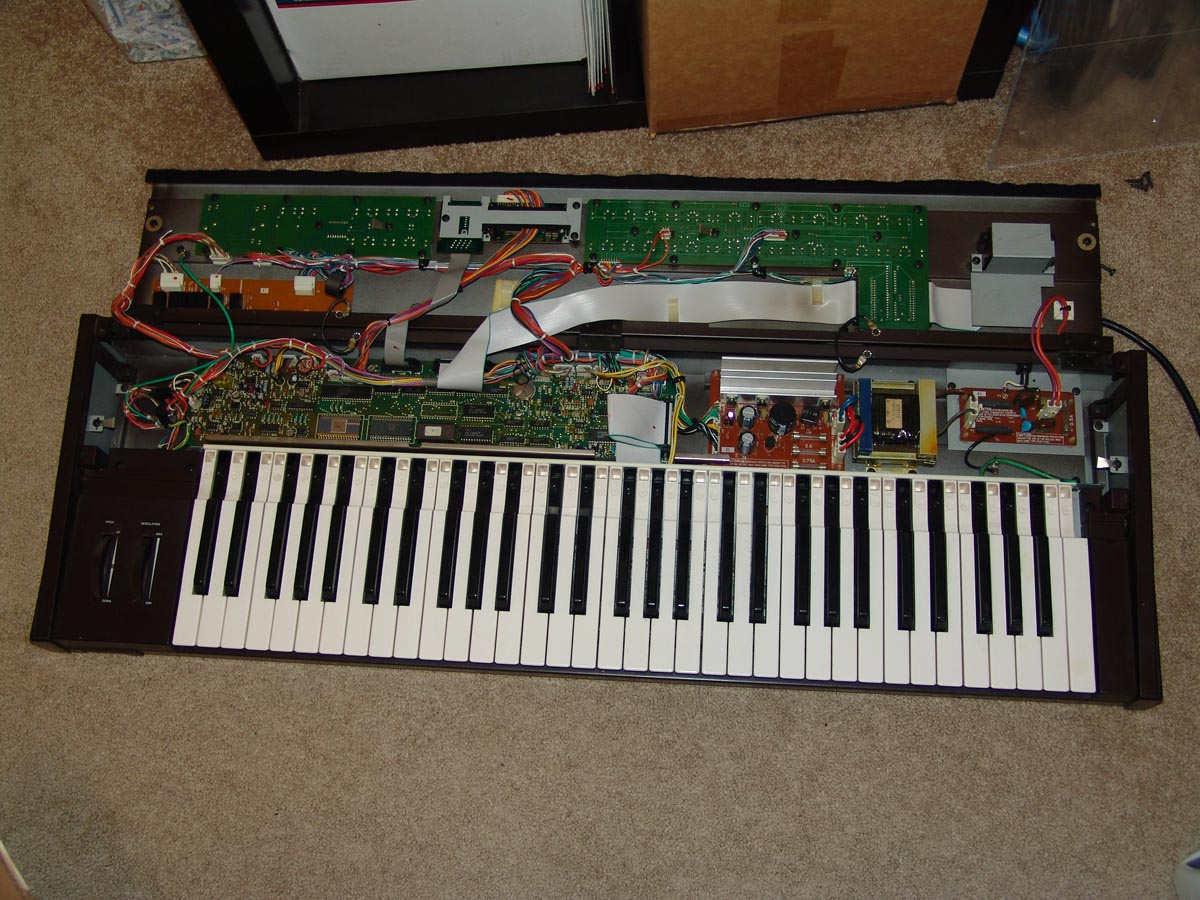
I recently had the chance to replace the battery in a Yamaha DX7 Synthesizer. The manual for the DX7 states that the battery should last for 3 to 5 years and it was well past that time. I first thought that I could just run down to Walgreens and pick up a “button” style battery and pop it in but after poking around on the Web, I found out that the DX7 uses a special kind of CR2032 battery with solder leads mounted on it. I found a suitable battery through Mouser (part number 614-CR2032FH-MFR). To replace the battery you basically have to take the whole synth apart, but Yamaha tries to make the procedure as painless as possible.
I found some very helpful instructions through Dave Benson’s DX7 Page (also archived here) for replacing the battery. These instructions were spot-on!
There were a couple of things I noticed while disassembling the synth.
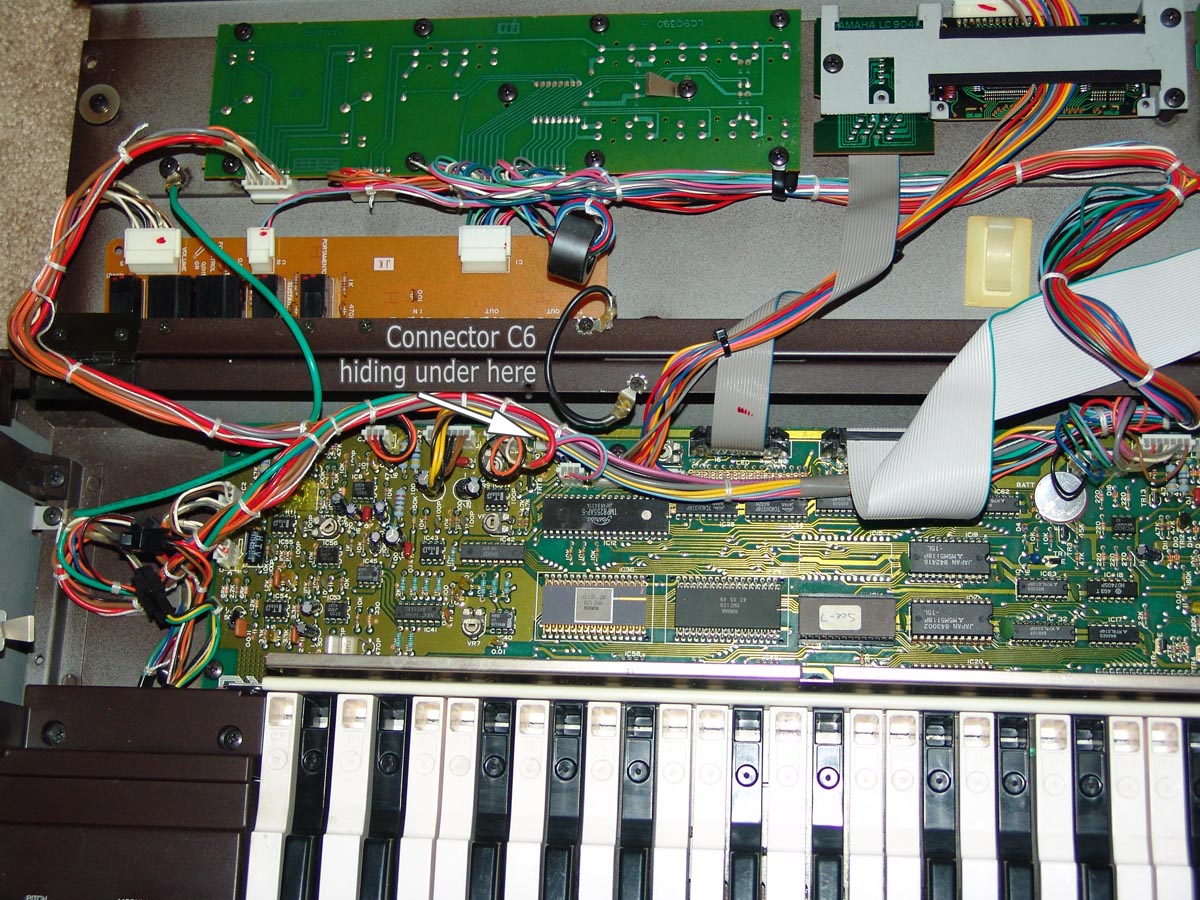
1. The connector labeled C6 on the main board is not connected to anything.
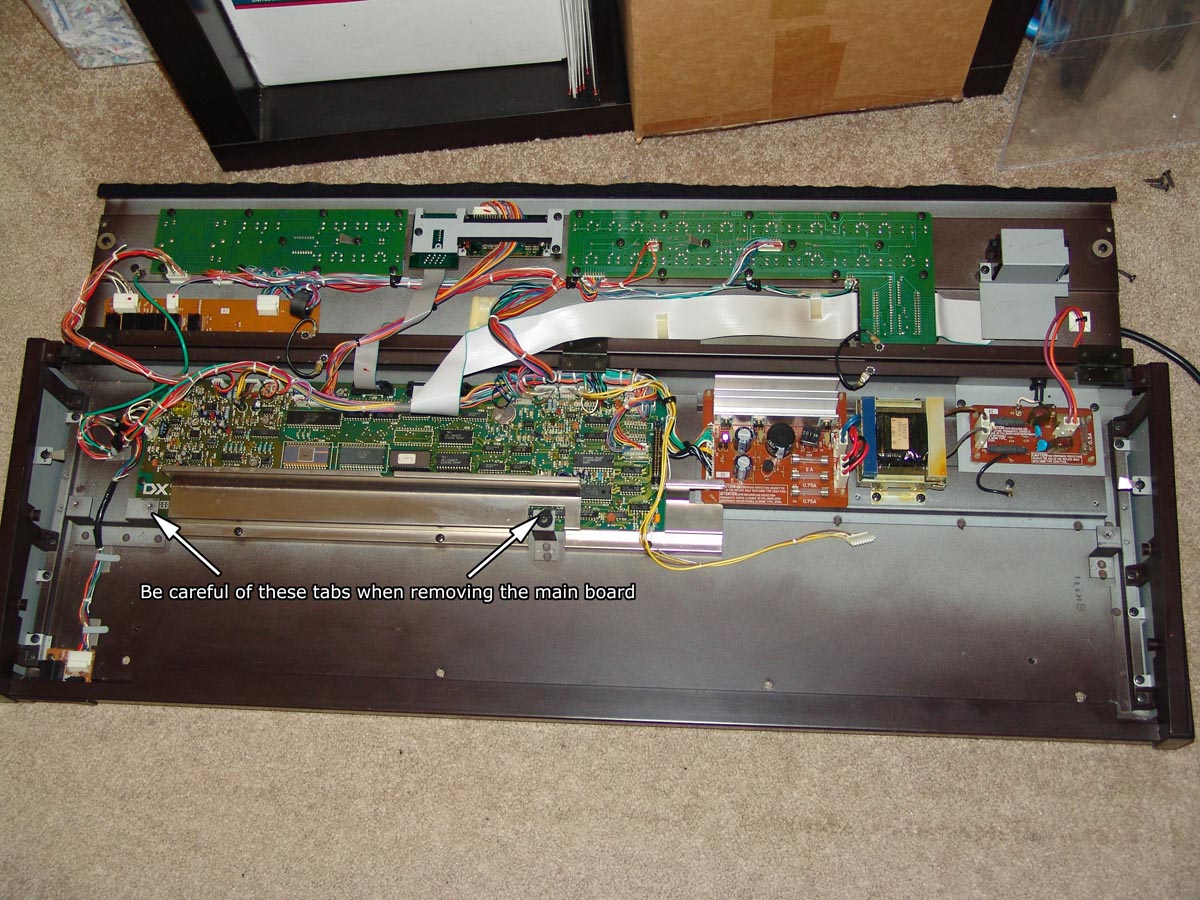
2. The main board was a little difficult to remove from the chassis after all screws and connectors were out. There are two tabs that are used to mount keyboard. You have to angle the main board between these tabs and the back of the chassis to lift the board out. Be careful when doing this!
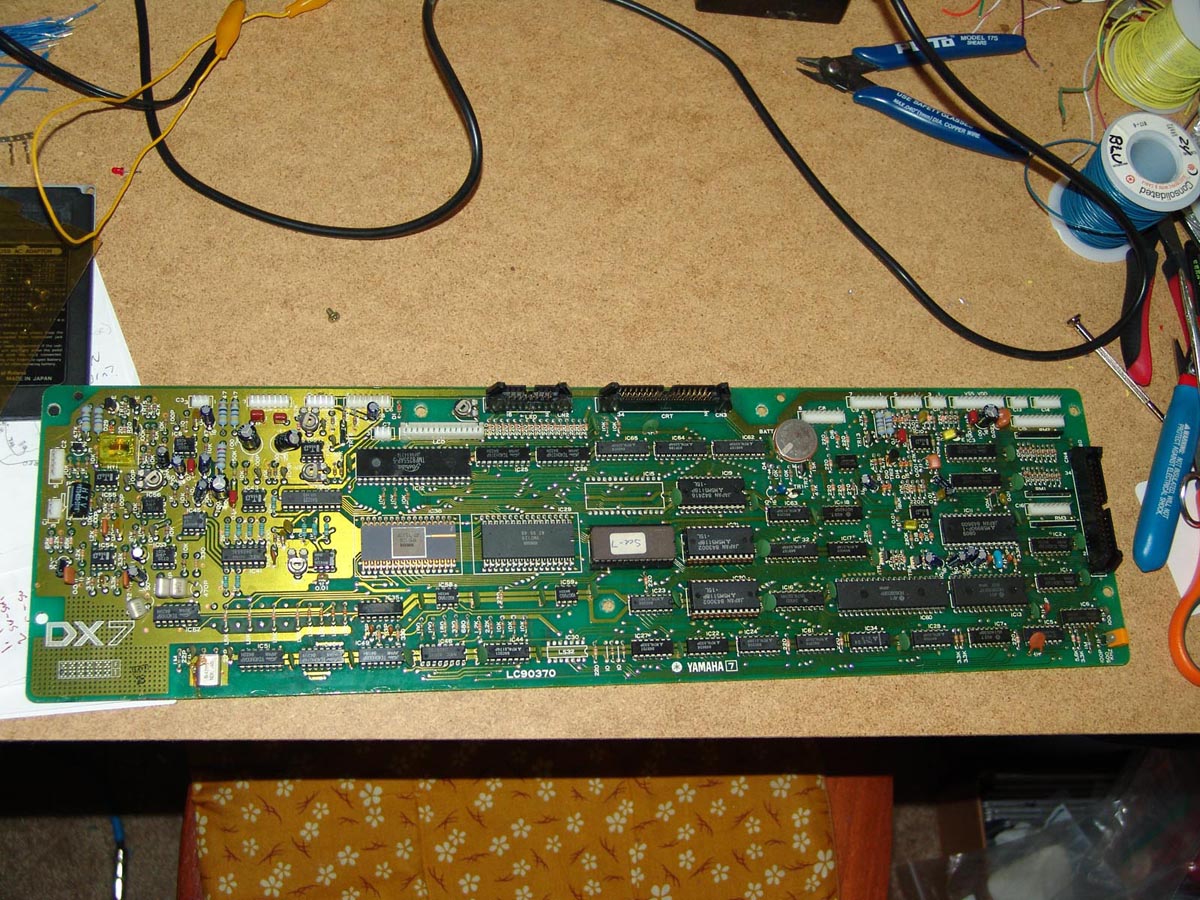
3. To remove the old battery, I used a solder sucker to get rid of most of the old solder which makes it easier for the old battery to pry up and out.
4. The battery evidently had been replaced before. There was a service sticker from some repair shop on the back of the unit. The trace between the battery’s positive lead and the next component (which is a diode) had been severed. I had to solder in a short jumper over the trace to fix it.
Overall, replacing the battery was not a difficult task but somewhat time consuming. Have fun!
You can click on the images below to get a larger image:

Thank you so much for this info!
I have been trying to replace the battery in my second-hand DX7 mk1 for the past 3 days. I have read just about every page on the internet in English and Japanese, including this one, time and time again. No matter how many times I tried to redo the battery I was getting a strange battery reading of 4.5V in the Function>Battery Test screen for what is in fact a 3V battery. The internal memory would be OK for about 30 minutes and then slowly start to corrupt until everything was lost.
I was ready to give up and assume it was a deeper motherboard issue until I read this again and decided I would take a look at the underside of my DX7’s motherboard and compare it to yours. What I found was that the trace coming off of the positive terminal of the battery that was supposed to connect to the next component had a gap in it in this kind of shape: —||—
The two separated vertical/parallel solder spots looked clean and square with no evidence of tampering, so I had been assuming that it came that way from the factory, but when I really looked close I noticed, “Hey, this positive terminal isn’t connecting to ANYTHING right now on either side of the board!” It was being separated by that otherwise professional-looking gap. Figuring I had nothing left to lose, I put a small bit of solder over the top to bridge the two, and VOILA – when I turned on the DX7 the battery reading was at a sensible 3.0v and my memory stays in tact now!
I have no idea how my motherboard ended up that way. I don’t know what that portion of the board looked like out of the factory because I don’t have another DX7 to compare it to, but I can only assume that the battery was changed before in an attempt to repair the unit and someone made a mistake.
I cannot thank you enough for taking the time to write this information up. I had given up on this keyboard and thought that it would become a mere conversation piece in my living room. Information on these keyboards is so scarce, so I really appreciate your willingness to share this. You have made my week. Cheers!!
I remember that that area around the battery definitely showed signs that people in the past had been poking around there. I’m curious if a cutter or a pair of pliers got out of control and cut the trace (cleanly!) ..
Thanks a lot for sharing your experience!!
Thank You for sharing the pictures are a great
help. I feel I can attemt this project now. I’m still am not sure about one thing. The internal sounds when the battery is off the board. This is a used unit I just bought,and I
do not have a back up card of origional sounds,and not sure how to back this up.
Will you please comment on this.
Thank you for your time.
Frank
Hey Bob,
My DX7 doesn’t start up anymore and I’m considering to change the internal battery. I’m not sure if you will answer this but I’ll give it a try anyway. I live in the UK and Mouser doesn’t ship that recommended battery there. Do you by any chance know if this battery would work?
http://www.batterymarket.co.uk/2-x-panasonic-cr2032-lithium-batteries-p-679.html
Regards,
Aron
@Frank Vella
You may want to look at dumping the sounds via MIDI. I actually was able to do a SYSEX dump of the original sounds by using MIDIOX http://www.midiox.com/ running on my PC. Take a look at Dave Benson’s DX7 Page at the link in the main post.
-bob
@Aron
I don’t think that one will work “out of the box”… The CR2032 battery that the DX7 needs has solder leads mounted to it. Take a look at Mouser’s catalog page
http://www.mouser.com/catalog/catalogUSD/641/2074.pdf
(It’s figure “G”) You just might be able to (carefully) solder your own leads to a regular CR2032 battery with a little work!
-bob
for stuff in the UK http://cpc.farnell.com/1/1/5791-button-cell-pcb-t25-2032-3v-cr2032-t25-maxell.html or maybe http://www.rewind-bits.co.uk/cr2032-tagged-lithium-cell-game-saves.html could be of use.
Another possibility is to remove the battery and replace it with a PCB CR2032 holder from Maplins or maybe Farnell and then you can use an ordinary CR2032.
It’s always a right pain trying to find the exact part!
In desperation you could try any tagged CR2032 (Google CR2032 solder) and connect with flying leads, insulate and shove in a space in the synth.
Jeff
Thanks for this, also. I just got a 2nd (3rd?) hand used DX& w/e! that is currently bricked. Seller stated battery was replaced. when powered up the LED numerals scramble and the lcd is solid boxes on the top half. I got the courage to open up and remove the board. Funny thing the battery tests at 2.7v, well within normal operating range. I tested traces from the battery’s terminals to other connected vias and noticed there was voltage, so I am considering re-seating the battery or a AAA external pack. Doesn’t lok like any traced are severed or lifting from someone’s over-wattaged soldering iron… Suggestions? thanks thanks, mt
I have a DX7 which I’ve owned since I bought it new around 1980 or so. I had E-Grey Matter installed soon after I got it.
Everything has worked fine until recently when I got a “corrupt Ram” message. From I’ve read, it seems it’s probably just a bad battery. Does anyone know if there is a batter for the “gray matter” circuit as well or is there just one battery for the DX7?
Thanks,
Charlie
Charlie,
Literally ditto for me. I talked to a guy at Yamaha USA and he told me that E “gray matter should be fine after installing a new battery which I was able to get from Yamaha Canada where I live for $20 including shipping. Incidentally, Grey Matter don’t appear to be in business any more, but I believe a card would have been installed when we bought
those sounds. I will pay a technician to install the battery, as I wouldn’t be capable, and just pray it all goes alright.
ciao,
Michael
@Mike Tosc regarding the E! Grey Matter board.
Like with Mike above, I am getting the same problem when powered up the LED numerals scramble and the lcd is solid boxes on the top half. The battery is fine as it worked great before I installed E! Grey Matter board. I took out the E! and re-installed the default IC chips and everything worked great as usual. There is something strange with the E! Grey Matter board.
Any updates from the last fewer posters would be great!
Thanks.
Jim
I also have an E! Equipped DX7 with a dead battery, and although I haven’t tried to replace the battery yet, I believe the scrambled memory problem is just the E! card complaining that the memory needs to be initialized / loaded. I’d bet once you get the battery situation straight, you wont have that problem anymore. I have used my DX7 since the battery went dead just ignoring that message, and using patches from cartridges, and it’s been fine.
I’ll try to remember to come back here and post experiences after I get to do the battery..
-Steve
Hi all.
I too have an early 80’s DX7 with E-Grey Matter.I’m the original owner and the battery just went dead now! I have what appears to be the right replacement battery,and I too am getting the scrambled LEDS, with no read-out in the LCD. Does any one know if there is a re-initialize process.(power up sequence)? You cant go by the original E instructions, because none of the displays or controls work. I’d appreciate any help. The system worked perfectly before the battery was changed, except for no presets.
Thanks
John
Hi,When your DX7 is giving wrong LCD message like Squared blocks in top of lcd screen and bad lcd numerals like sometimes a 8 or 88 in lcd screen and sometimes a bad crazy and very distorted sound after a battery change,then you made a mistake placing the battery,the negative side(-)of battery has flatten the contact point to make a wrong contact with another contact point,giving the DX7 internal circuits a short circuit,resulting into bad behaviour and sound,after you fix this everything is ok and working 100%,it is not that after this your DX7 has died,
Greetings:Bert
Hey,
I recently got a DX7 and everything seems absolutely fine. However, I checked the battery status and it fluctuates over extended use (shows 3.3v at the moment). It has gone over 4v on occasions.
There doesnt seem to be any problem with the DX7 retaining the patches and settings, but it does concern me, as the voltage readings are above the normal opperating range stated in the manual 🙁
Any ideas on what I should do?
Also, should DX7’s be grounded? There is no earthing wire on mine, and I feel a slight static, if i run my fingers across the metal surfaces :/
Thanks,
Toby
@bob, my dx7, it doesnt switch the sound anymore,, its that the battery or memory??? Hope 2hear from you , adls826@yahoo.com ,tnx
Hey guys,
I’m hoping someone on here can help me. I replaced the battery in my DX7 Mark I some time ago and never could get it working again after that. I get power and my LCD screen comes on with the typical “Yamaha DX7 Synthesizer” as it should, but then changes to a screen that says “Memory protect cartridge on” and won’t change. I cannot make any buttons respond at all. Prior to battery replacement, it worked fine.
Could someone please give me an idea of what to look for? What could I have messed up?
This stinks!
Help Please! Contact me at josh@shadrack.com
Thank you!
Just been reading the other comments to see whether I have a dead battery problem with my DX7 11D. Mine powers up okay but no sound for some reason. Anyone out there got any ideas?
Thanks for the awesome directions! I recently bought a Yamaha DX7 and the battery was almost gone, I found your website and gave the directions to my friend to replace the battery. He said these were spot on and the step by step made the job easier! What a great help. Keep up the good work. Appreciate your website!
Hi everybody:
¡¡¡Please, please, help!!
I’ve been using my DX7 normally until now and sudenly, when I turn it on my LCD screen comes on with the typical “Yamaha DX7 Synthesizer” as it should, but nothing else happens. No sound, no nothing. It doesn’t work and I don’t know what to do.
Please, any suggestion?? any advise??
Thanks in advance.
Hello everyone,
I have a DX7, and just like SinMASS, the screen comes on with “Yamaha DX7 Synthesizer” as it should, but nothing else happens. There is no sound. There is also a REPLACE BATTERY! message. The battery voltage is 4.8 in the BATTERY CHECK screen/
Please Help!
Thanks
Is there enough room to solder a standard battery holder (*)
instead of soldering a new battery directly, so as to make the next battery replacement much way easier?
(*) http://shopping.microbattery.com/core/media/media.nl?id=7073&c=ACCT84789&h=f660d8a17ce3bc59fcbd
Hello,
I’m getting the same error as “JakeO” and “SinMass”. The screen comes on with “Yamaha DX7 Synthesizer” as it should, but nothing else happens. There is no sound.
Any ideas what the problem is? Did either of you guys fix the problem?
Thanks,
Jim
Thank you, Bob, Kevin and all of you that spent your time giving some help.
I had to replace the battery socket of my DX7 and there was the gap –||– in the PCB; I short it with solder and everything is fine now.
If you want, download the sounds I created many years ago for the DX: http://www.music-center.com.br/index.php?option=com_content&view=article&id=363&Itemid=28
I’m also getting the same error as “JakeO” and “SinMass” !!! Any ideas? The Yamaha DX7 message I hear a click sound then ’88’ comes up then goes to preset 10 none of the buttons work or change presets no sound just hiss and the hiss gets louder if I turn up the volume. Thanks in advance. I’ve tried taking out the CN3 & CN4 leads and plugging them in again after I did this I got the Yamaha DX7 message which didn’t come up before all I got was the DX7 going straight to preset 10 then goes nowhere after that – nothing functions apart from the volume and power.
just tried replacing battery in my dx7 with e!. instead of taking out the old battery, tried clipping the hot side, and soldering in a lithium “AA” battery which i twist tied to some other wires. now i get the same 88 message which is preceded by a click. if i figure anything out i’ll post. thanks
I had the problem with my DX7 (after it was dropped from a height of 4 feet when the keyboard stand collapsed) where upon power up the LED display was “88” and the LCD display was all black boxes, and none of the keys or buttons worked.
Doing a Google search for “dx7 display 88” I saw where others had posted of having similar problems and their attempts to troubleshoot but nothing of a final fix for this, so I am posting my experience here.
After some trobleshooting (opening up the DX7, removing and inspecting all the circuit boards looking for cracks, checking for +5, +15, -15 voltages at the ICs), turning off the power and removing the CR2032 memory battery and waiting to reset everything back to its default state with no results, I then thought to check for clock frequencies using an oscilloscope. There was no 9.4265 master clock frequency at pins 5 or 6 of IC 48, just a straight line. For comparison there was a 4 MHz clock frequency (a nice beautiful 4 MHz sine wave) at pins 4 and 5 of Sub CPU IC 13.
Not having a spare 9.4265 MHz Crystal I substituted a much more common 10.000 MHz crystal for test purposes and the displays came up normally (except for the patch memory obviously being wiped out). I ordered a 9.4265 MHz crystal from International Crystal Manufacturing http://www.icmfg.com/ 1-800-725-1426 and ordered a 9.4265 MHz HC-49 case, series resonant, 20 pf load capacitance (because they insisted of having these specs defined and I thought these were the most likely for that crystal) and was told three weeks delivery time.
WendyStringer48088@gmail.com
March 9, 2013
[IMG]http://i46.tinypic.com/wqqxcp.jpg[/IMG]
[IMG]http://i46.tinypic.com/289wzn7.jpg[/IMG]
[IMG]http://i45.tinypic.com/sy2x4g.jpg[/IMG]
[IMG]http://i50.tinypic.com/70xn9k.jpg[/IMG]
Yamaha DX7 LED = 88, LCD = Black Boxes caused by a bad 9.4265 MHz Crystal
I had the problem with my DX7 (after it was dropped from a height of 4 feet when the keyboard stand collapsed) where upon power up the LED display was “88” and the LCD display was all black boxes, and none of the keys or buttons worked.
Doing a Google search for “dx7 display 88” I saw where others had posted of having similar problems and their attempts to troubleshoot but nothing of a final fix for this, so I am posting my experience here.
After some trobleshooting (opening up the DX7, removing and inspecting all the circuit boards looking for cracks, checking for +5, +15, -15 voltages at the ICs), turning off the power and removing the CR2032 memory battery and waiting to reset everything back to its default state with no results, I then thought to check for clock frequencies using an oscilloscope. There was no 9.4265 master clock frequency at pins 5 or 6 of IC 48, just a straight line. For comparison there was a 4 MHz clock frequency (a nice beautiful 4 MHz sine wave) at pins 4 and 5 of Sub CPU IC 13.
Not having a spare 9.4265 MHz Crystal I substituted a much more common 10.000 MHz crystal for test purposes and the displays came up normally (except for the patch memory obviously being wiped out). I ordered a 9.4265 MHz crystal from International Crystal Manufacturing http://www.icmfg.com/ 1-800-725-1426 and ordered a 9.4265 MHz HC-49 case, series resonant, 20 pf load capacitance (because they insisted of having these specs defined and I thought these were the most likely for that crystal) and was told three weeks delivery time.
WendyStringer48088@gmail.com
March 9, 2013
Pictures:
http://i46.tinypic.com/wqqxcp.jpg
http://i46.tinypic.com/289wzn7.jpg
http://i45.tinypic.com/sy2x4g.jpg
http://i50.tinypic.com/70xn9k.jpg
Thanks for this help, i’m not sure – but i think to remember the words “unsold by changing battery” in any repair manual i used years ago, when i first time change a battery in a DX7.
Now i got that problem again – a customer give me his DX7 to change the battery – and after changing, the sounds get lost. I take google and i found this help in your website. Remebering that words “unsold by changing battery”. In my DX you can see, that the solder spots are “younger” than the “original” spots on the rest of the mainboard.
I can’t explain what happend – but now the DX workes very fine.
THANKS!!
Good advice from the writings listed here. I re-thought what I will need to do to replace the hardwired battery and changed course. I got a battery holder for a standard button battery, CR3032 from an old defunct computer I had, and soldered a small cabe with 2 wires to the holder and put a CR3032 battery in the holder, taped over the battery with electrical tape and placed it at the left side of the mother board where there is blank space available. I ran the wire to the old battery and carefully peeled the positive welded contact off the dead battery and then with a little slow force got the other welded negative contact off the dead battery. I then clipped heat sinks / small hemostats / clamps near the base of the soldered old welded battery terminals so I would not unsolder them from the circuit board when I soldered the wires from the cable to these terminals. I used a heat controlled soldering iron so overheating would not occur. Did not have to dissasemble the cables and mother board and keyboard. Just had to open the hood of the DX7. I reloaded the sounds from the ROM cartriges and reset some of the settings for the pitch, modulation, etc.
Works fine.
I have a mk 1 dx7 which will not turn on properly. when switched on the led display initially shows 8. lcd shows black squares, the output relay buzzes and the 8 becomes 88. lcd still black boxes, a few seconds later the relay clicks and the led and lcd displays go blank. there is still power as I can hear hissing through headphones. I have checked he internal battery voltage which is 2.99v read from the top of the battery to ground, synth unplugged from mains.
all suggestions and comments eagerly awaited, thanks in advance, Cliff.
I snipped off the old CR2032 battery and added a lithium AA 3.5V battery.
https://www.youtube.com/watch?v=bZMJk8QkNzw
ALso, I changed the display to a backlit one from amazon
Costs only $3 Canadian
https://www.youtube.com/watch?v=-FQV4ag0RKE
I have a DX7s and the battery needs replacing ,I have the same readings on the screen. I have been using the keyboard to control main stage on the computer. But everytime I leave it off for a while the channel changes to 16 and the buttons like 1 goes to 240 , 2 goes to 57. Would that be a battery problem ? I thought midi setups stayed the same Thanks
My friends dx7 is having an issue with the internal memory protect button. Tried doing sysex transfer off computer but kept getting error message and we found the memory buttons and the other two beside them dont respond. All other buttons seem to work fine but these and we cant get it to turn memory off for loading sysex. Any ideas?
Also everything is connected internally and can seenor smell anything burned . Tried cleaning as well to no avail.
Also wheres a good place to find the cartridges